
驱动下载、安装与卸载
自动手碟 0.1.6 使用 Interception v1.0.1 驱动。安装和卸载后都需要重启电脑。
下载哪些文件
在 Assets 中下载 Interception.zip,不要选 Source code,也不要使用第三方重打包的驱动。
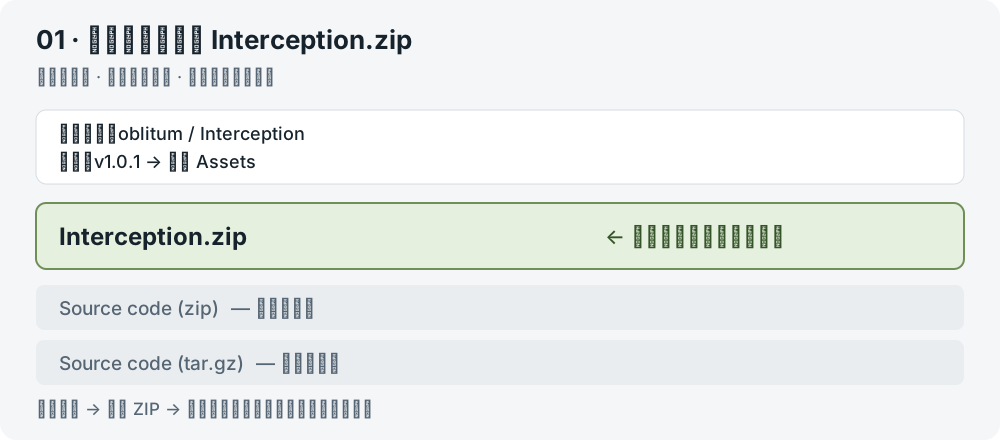
| 文件 | 在哪里 | 玩家需要做什么 |
|---|---|---|
install-interception.exe | 驱动 ZIP 内 Interception/command line installer/ | 管理员终端执行安装或卸载,之后重启 |
x64 interception.dll | 驱动 ZIP 内 Interception/library/x64/ | 当前手碟包已自带对应 DLL,正常使用无需另行复制 |
| 软件自带的 DLL | 自动手碟目录 Input/Interception/x64/interception.dll | 保留目录结构;缺失时重新完整解压官方软件包 |
interception.lib、源码和示例 | 上游驱动包内 | 正常使用不需要操作,也不用编译 |
键盘厂商的灯光、改键软件不能替代 Interception,两者可以保留。
安装与重启
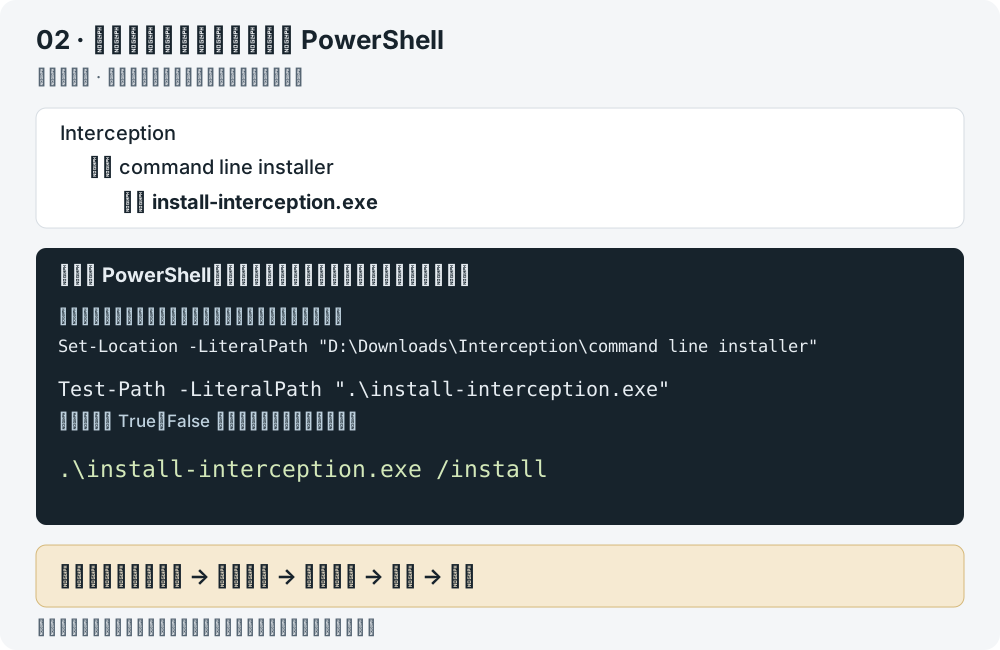
- 下载并完整解压上面的 Interception.zip。
- 打开解压后的
command line installer文件夹,确认其中有install-interception.exe,点击资源管理器地址栏复制完整路径。 - 在 Windows 开始菜单搜索 PowerShell,右键选择 以管理员身份运行。
- 保存工作并关闭游戏。在管理员 PowerShell 中执行下面两条命令,把第一条的路径换成刚才复制的路径:
powershell
Set-Location -LiteralPath "D:\Downloads\Interception\command line installer"
Test-Path -LiteralPath ".\install-interception.exe"
显示 True 表示已找到安装器;显示 False 时重新检查文件夹路径。找到安装器后执行:
powershell
.\install-interception.exe /install看到 Interception successfully installed. You must reboot for it to take effect. 后,通过 Windows 开始菜单选择 重启。
重启后打开自动手碟,继续下载并导入曲子。安装报错时,保留完整提示并查看驱动问题。
官方说明中的系统测试范围只到 Windows 10,较新系统的兼容性需要实际确认。如果系统阻止加载驱动,先保留错误提示,不要关闭安全启动、内存完整性或签名保护。
可选:检查下载文件是否一致
在普通 PowerShell 中运行,替换成你实际下载的文件路径:
powershell
Get-FileHash -LiteralPath "D:\Downloads\Interception.zip" -Algorithm SHA256以下是本项目记录的 v1.0.1 文件校验值:
| 文件 | SHA-256 |
|---|---|
Interception.zip | AD038963D6413055765128B0B931F6E765147C9916DBA79E65D872B261F9AF10 |
install-interception.exe | E137863A79DA797F08E7A137280FF2A123809044A888FD75CE9C973198915ABE |
x64 interception.dll | AB88164C11B1B48488772D4C3BFAA4509D5B0AE9DBC5A691DC4F96F0260443C8 |
校验值不一致时,先核对版本、下载地址和文件。校验通过也不代表游戏一定支持该驱动。
记录中的安装器和 DLL 没有嵌入式 Authenticode 签名,驱动文件的签名需另行查看。遇到系统拦截时请保留提示。
不用了怎么卸载
- 保存曲谱,停止演奏,关闭自动手碟和其他使用 Interception 的软件。
- 找到原来解压的
install-interception.exe。丢失时重新从本页的官方链接获取同版本驱动包。 - 以管理员身份打开 PowerShell,进入安装器所在文件夹。
- 执行以下命令,查看输出并保存错误信息:
powershell
.\install-interception.exe /uninstall- 卸载成功后手动重启电脑。
删除自动手碟文件夹不会卸载系统驱动。卸载 Interception 也会影响其他依赖它的工具,请确认后再操作。不要手工删除 Windows 系统目录里的驱动文件。